Article Original Creation Date: 2015-07-08
Overview
ServiceGateway is not able to send a template object, out to a device, when assigning it a value ending with a # symbol. It works fine if the # symbol is at any other position instead of the end.
Environment
- Solaris 10
- Oracle 10
- WL 9.2.3
- ServiceGateway (SG) 4.2.3
- Apache 5.5.25
Root Cause
Templates in ServiceGateway use velocity scripting, which requires certain "escape characters" to be able to use special characters.
Resolution
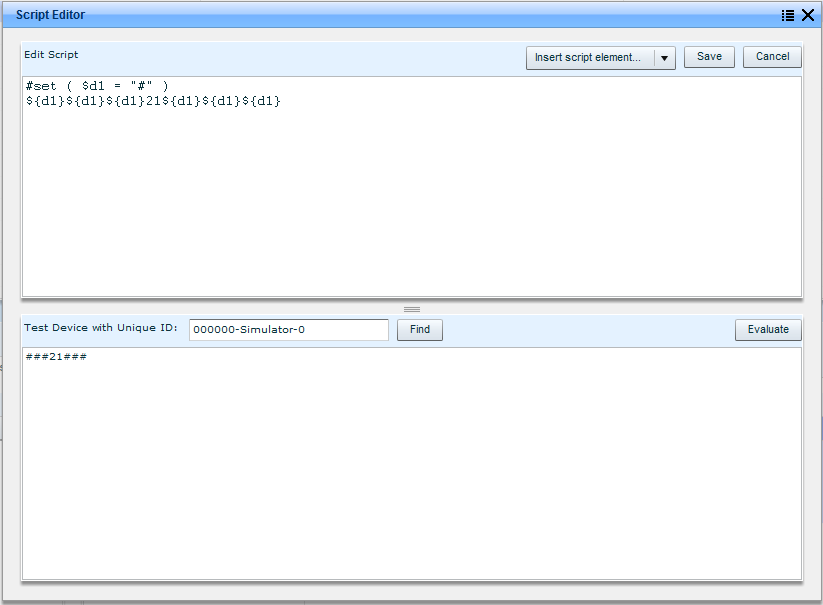
Escape characters are needed to format values with special characters. For example, If you want to send the string ###21### to a device, use "escape characters" as shown below:
 #set ( $d1 = "#" )
 ${d1}${d1}${d1}21${d1}${d1}${d1}
To set up a template in ServiceGateway, follow the steps mentioned below:
-
Hit the icon on the right of the value field within the Apply Settings tab.
-
A Script Editor opens. Type in the script for string value using "escape characters":
You can also test the value against a device (Test device with Unique ID). Find the device first and then click Evaluate.
Priyanka Bhotika
Comments